Connect ReCharge to SourceMedium with a read-only Admin API token.
ReCharge powers your subscription orders and recurring revenue. SourceMedium reads ReCharge to classify subscription behavior and recurring revenue alongside your Shopify orders. That includes subscription charges and one-time add-ons sold on a subscription checkout (onetimes).
SourceMedium connects to ReCharge with a read-only Admin API token that you create in ReCharge and paste into SourceMedium.
Sign in to SourceMedium, open your store, then choose Data sources → Connect data source and select the platform. You need an Admin or Editor workspace role.After you connect explains the first sync and connection statuses.
1
Create a read-only Admin API token in ReCharge
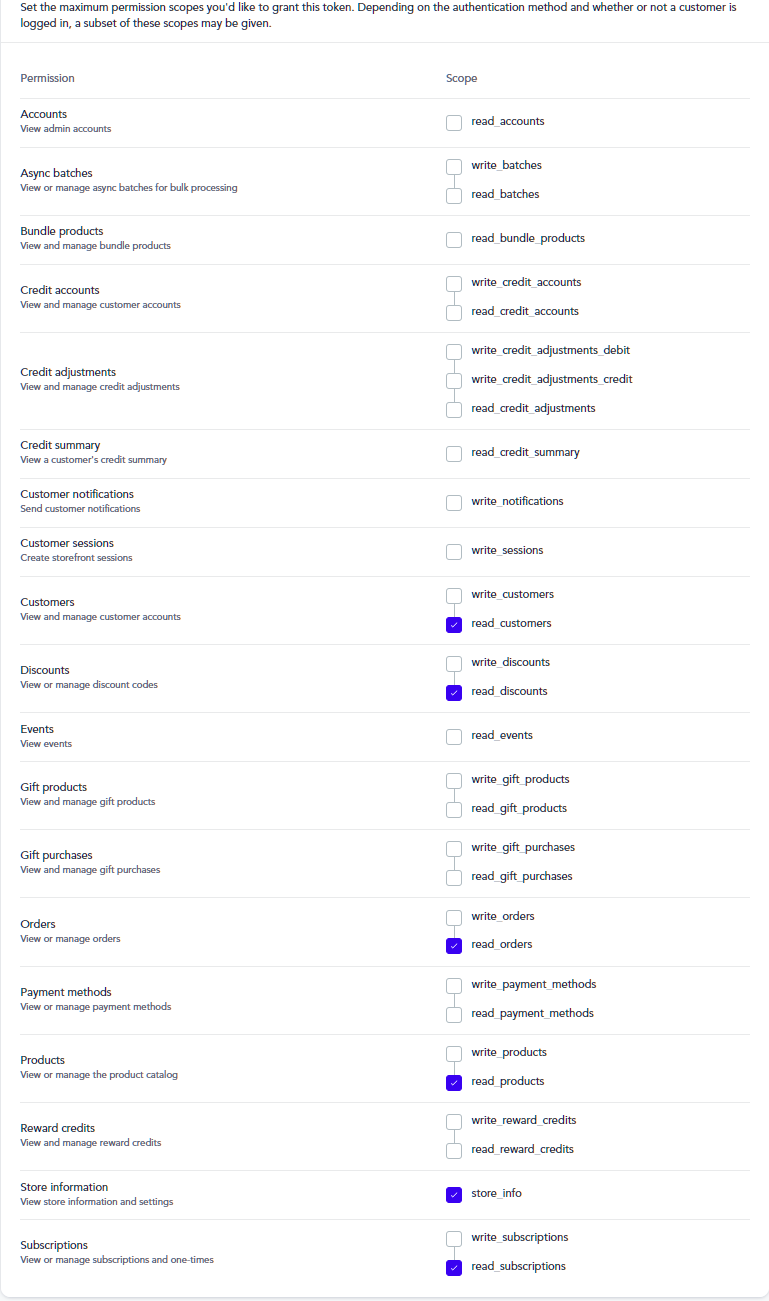
Sign in to the ReCharge merchant portal (from Shopify, Apps → ReCharge). Open Tools & apps → API tokens and click Create an API Token.In Details, name the token SourceMedium and enter your own contact email. Give the token read access to Customers, Discounts, Orders, Products, Store information and Subscriptions, and no other access. Click Save and copy the token.
Read access for the six permissions SourceMedium needs
Only the store owner sees API tokens by default. See ReCharge’s guide: Recharge API token.
2
Add the token in SourceMedium
Find ReCharge in the connector picker and click Connect. Paste the API token and click Save.
3
Confirm it is connected
SourceMedium checks the token with ReCharge before saving it. A token ReCharge rejects as invalid is refused on the spot. If ReCharge cannot answer, or the token lacks a permission, SourceMedium saves it and finishes the check later. The connection reads Awaiting first data until the first sync lands, then Connected.
SourceMedium only ever reads from your connected platforms. It does not create, change, or delete anything, so create the key with read-only access wherever the platform offers it. Treat it like a password: keep it confidential and avoid sharing it over email or in spreadsheets. If the credential is rotated or revoked, follow this guide’s connection method to update SourceMedium.
If the connection shows Needs reconnection, open it in SourceMedium and click Reconnect. You repeat the steps above: approve access in the platform or paste a new key, then confirm the accounts and save. If you cannot do it yourself, use Ask someone else to connect where it is offered.If the connection shows Paused because SourceMedium paused it after six months without new data, reconnect it the same way. That is the only way to resume it. Your historical data is kept and nothing is scheduled for deletion. See When SourceMedium pauses a data source. A data source you paused yourself resumes with Resume data source instead.
No “API tokens” option in ReCharge? Only the store owner sees it by default. Ask the owner to create the token or to give your account access to API tokens.
Token saved but never shows as verified? SourceMedium checks it by reading your store information. Make sure the token has Read access to Store information, then reconnect with it.
Reached ReCharge’s API token limit? Delete a token you no longer use, or ask ReCharge support for another.