

Requirements
Samples, returns, and exchanges/reshipments can be identified by order tags, discount codes, or SKUs. Samples, returns, and exchanges/reshipments if not segmented properly can impact your core metrics and analysis. These orders typically have a $0 impact from a transaction standpoint, but may influence your Average Order Value (AOV), Cost Per Order (CPO), and other top-line metrics. A customer who receives a sample or an exchange should also not be counted in your retention/lifetime value analyses. SourceMedium allows you to sort out these orders into separatechannels and sub-channels, which isolates these orders and provides a cleaner view of your most important KPIs.
Steps
-
Isolate the discount codes, order tags, or other unique identifier(s) for your samples, returns, exchange/reshipments, or other orders that you’d like to separate from your core metrics
-
Tip: Use the
Orders Deep Diveto isolate $0 orders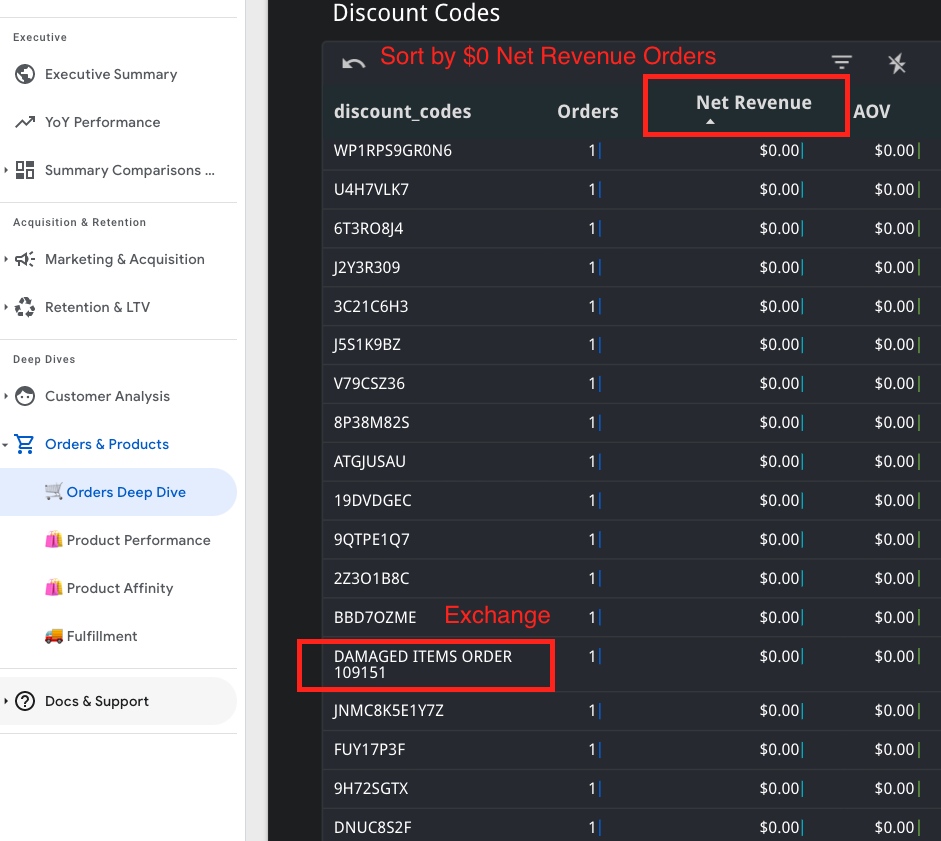
-
Tip: Use the
-
Create a separate orders
channelusing your Configuration sheet-
Follow the How can I create channels and sub-channels FAQ for detailed instructions
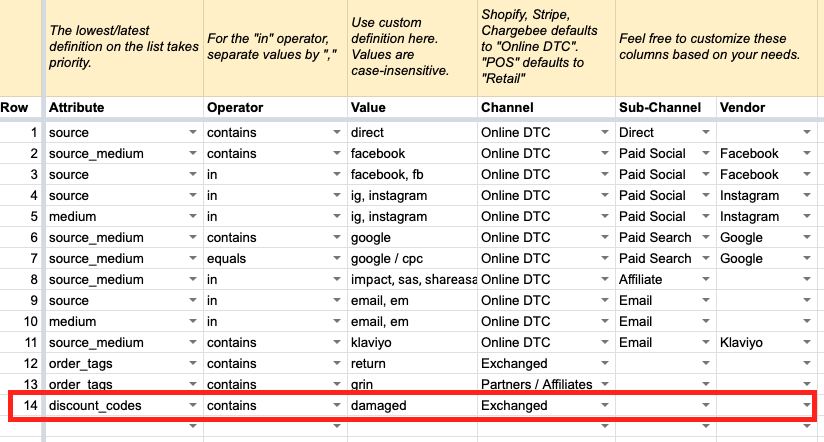
-
Follow the How can I create channels and sub-channels FAQ for detailed instructions
-
Once the rule(s) have been set in your Configuration sheet, they are picked up on the next refresh for the report or table that uses that configuration
- Any rule(s) set up within the Configuration sheet will work for historical and go forward orders that conform to the rule(s) set in place