Connect Awin to SourceMedium with a user API token.
Not accepting new connections for ShareASale. Existing connections can still reconnect and sync.
Awin affiliate performance flows into SourceMedium alongside your other channels. ShareASale programs moved to Awin in 2025, so connect them with this Awin connector. There is no separate ShareASale listing.
SourceMedium connects to Awin with a user API token that you create in Awin and paste into SourceMedium.
Sign in to SourceMedium, open your store, then choose Data sources → Connect data source and select the platform. You need an Admin or Editor workspace role.After you connect explains the first sync and connection statuses.
1
Copy your API token in Awin
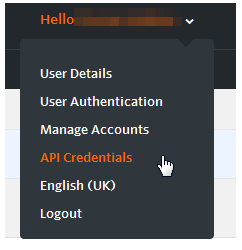
You need admin access to the advertiser account (Account → Account Permissions), and advertiser API access needs an Awin Accelerate or Advanced plan. Open the user menu at the top right and choose API Credentials.
API Credentials in the Awin user menu
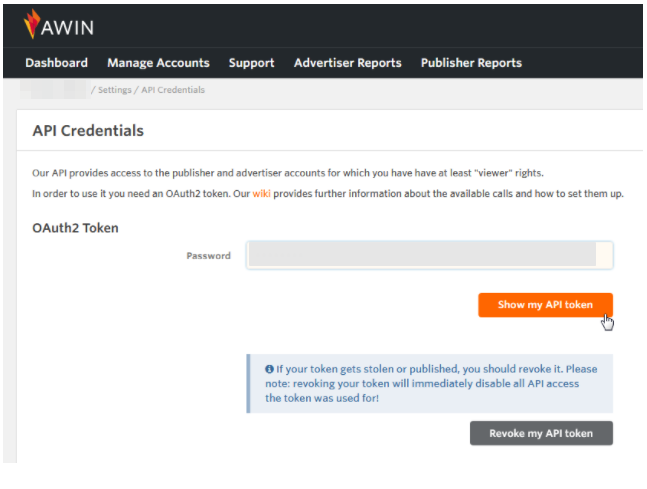
Enter your Awin password, click Show my API token, and copy it.
Show my API token
The token belongs to your Awin user and reads every account you can access. Every tool that uses it shares it, and Revoke my API token stops all of them at once. See Awin’s guide: API authentication.
2
Add the token in SourceMedium
Find Awin in the connector picker and click Connect. Paste the token into API Token and click Find programs. Select the advertiser program and click Connect Awin.
3
Confirm it is connected
SourceMedium checks the token before saving it. SourceMedium’s own Awin sync is not live yet, so the connection reads Awaiting first data until it starts. Nothing more is needed from you.
If account lookup is unavailable, SourceMedium saves your credentials securely and shows that account verification is pending. Choose Try again, or reopen the form and choose Use saved credentials, to continue without pasting them again. Use the same SourceMedium login that saved them.Saving credentials does not activate an unverified account selection. If you are replacing a working connection, its existing credential and sync settings stay in use until the replacement is verified.
SourceMedium only ever reads from your connected platforms. It does not create, change, or delete anything, so create the key with read-only access wherever the platform offers it. Treat it like a password: keep it confidential and avoid sharing it over email or in spreadsheets. If the credential is rotated or revoked, follow this guide’s connection method to update SourceMedium.
Was this page helpful?
Assistant
Responses are generated using AI and may contain mistakes.