

Targets tab of your Configuration Sheet, then ask your account manager or integrations@sourcemedium.com to enable target setting and add the target widgets to your Executive Summary.
Target setting is available for the following metrics
Target setting is available for the following metrics
- Net, Total and Gross Revenue
- Orders
- Spend
- AOV
- CPA
- CPO
- CVR
- Sessions
- ROAS

Steps
-
Open your Configuration Sheet from your store in the SourceMedium workspace with Open sheet. (Other ways to find it)
-
Open the
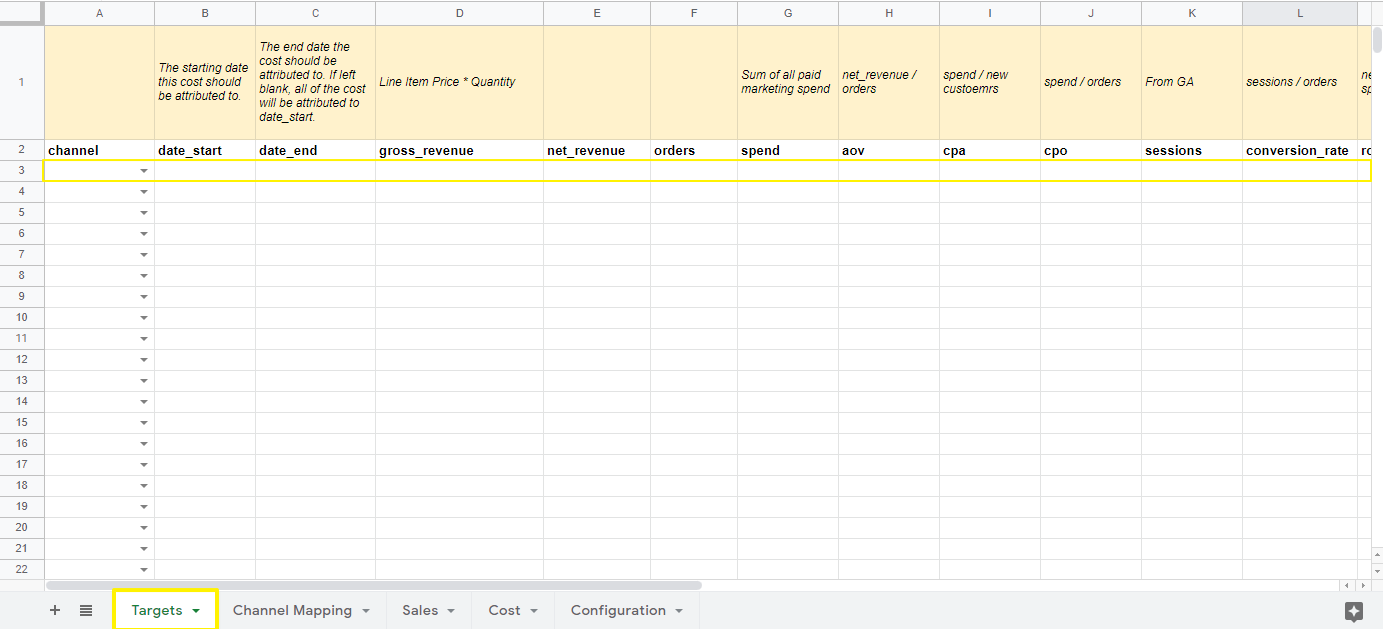
Targetstab -
Select a channel. This is the sales channel you want to track metrics for, for example
Online DTC. Online DTC is the only option available at the moment. -
Add a
date_startto indicate when the goal starts (we encourage month-to-date tracking). -
Add a
date_endto set the period the target applies across. If left blank, the target applies to thedate_startday only.- Targets are applied as daily values across the range from
date_starttodate_end(inclusive). - If you want a monthly total target, enter the per-day target value for the month and set
date_endto the last day of the period.
- Targets are applied as daily values across the range from
-
Add target values for the metrics you want to track.
- Ask your account manager or integrations@sourcemedium.com to add the target widgets to your dashboard.