

For sources that use a platform sign-in, such as Shopify or Google Ads, you can email a setup link to the teammate or agency with access. They can finish without a SourceMedium account. You need an Admin or Editor role to send the request.
  1. Open your store, choose Connect data source, and select the platform.
  2. Choose Ask someone else to connect, where offered.
  3. Enter their email address and choose Send request. Check the receipt to confirm the email was sent. If it was not, copy the link and share it yourself.
  4. They follow the link, authorize access, and select accounts if needed. They should finish in the same browser.
  5. Return to the connection to check progress. Open authorization requests shows what remains and when the link expires. Choose Revoke link if you need to cancel it.
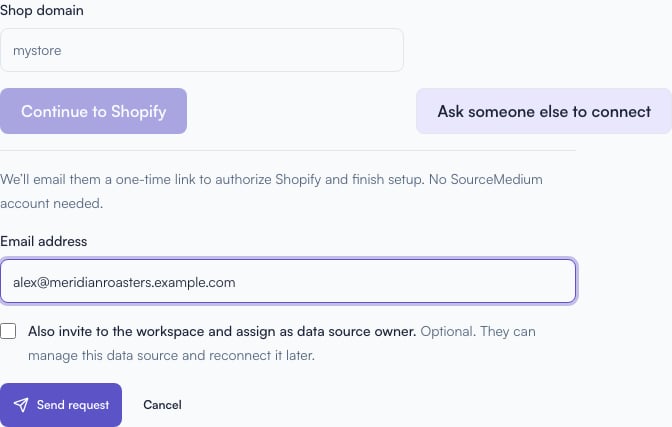
Shopify setup with Ask someone else to connect expanded, an example email address, an unchecked workspace invitation option, and Send request

Enter the person's email and send the request. Leave the workspace invitation unchecked if they only need to connect the source.

Existing connections can also offer Ask someone to connect when they need reconnection.

Decide whether they also need workspace access

The setup link only lets them connect that source. The optional Also invite to the workspace and assign as data source owner grants Editor access to every brand and store in your workspace. Leave that option unchecked for someone who only needs to authorize the source. Read Roles and permissions before inviting an external partner. Once connected, After you connect explains the first sync and what each status means.