> ## Documentation Index
> Fetch the complete documentation index at: https://docs.sourcemedium.com/docs/llms.txt
> Use this file to discover all available pages before exploring further.

# Reconnect a data source

> Restore an expired Shopify authorization without changing accounts.

<Note>
  You need the **Editor** role (or Admin) in your workspace for this. See
  [Roles & permissions](/product-tours/roles-and-permissions).
</Note>

Watch the short narrated walkthrough, or follow the written steps and
screenshots below.

<Frame>
  <video controls className="w-full aspect-video" src="https://mintcdn.com/sourcemedium/vJWhKdrmNWXiJXVp/images/product-tours/reconnect-data-source/demo.mp4?fit=max&auto=format&n=vJWhKdrmNWXiJXVp&q=85&s=67e46dc96196f1d72cc8bd0fca89c47c" poster="/images/product-tours/reconnect-data-source/01-find-the-connection-that-needs-attention.png" data-path="images/product-tours/reconnect-data-source/demo.mp4" />
</Frame>

<Steps>
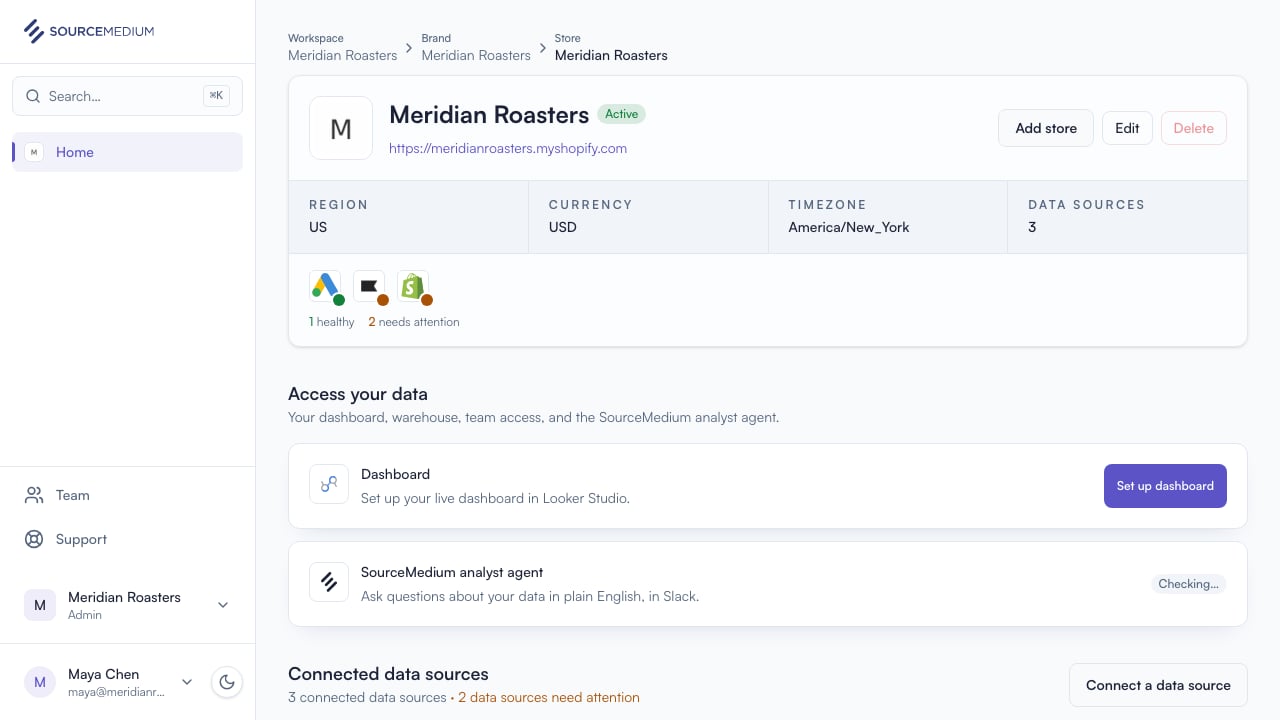
  <Step title="Find the connection that needs attention">
    The store page calls out an expired authorization and gives you one clear recovery action.
    <img src="https://mintcdn.com/sourcemedium/vJWhKdrmNWXiJXVp/images/product-tours/reconnect-data-source/01-find-the-connection-that-needs-attention.png?fit=max&auto=format&n=vJWhKdrmNWXiJXVp&q=85&s=e0c03feda2e912db971e4dddd23ad97e" alt="Find the connection that needs attention" width="1280" height="720" data-path="images/product-tours/reconnect-data-source/01-find-the-connection-that-needs-attention.png" />
  </Step>

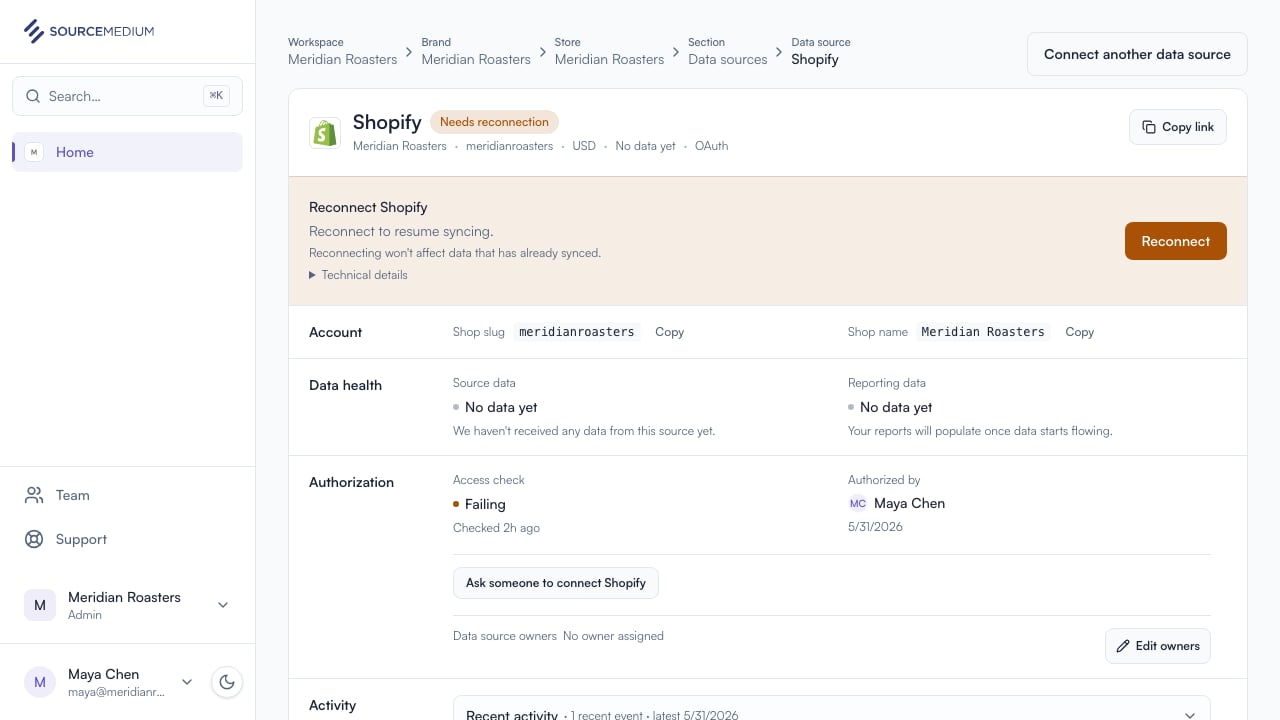
  <Step title="Open Shopify details">
    The detail page keeps the current account visible while offering a safe same-account reconnect.
    <img src="https://mintcdn.com/sourcemedium/vJWhKdrmNWXiJXVp/images/product-tours/reconnect-data-source/02-open-shopify-details.png?fit=max&auto=format&n=vJWhKdrmNWXiJXVp&q=85&s=cf296c0c673d57a86533d1b830b41dbe" alt="Open Shopify details" width="1280" height="720" data-path="images/product-tours/reconnect-data-source/02-open-shopify-details.png" />
  </Step>

  <Step title="Approve renewed access">
    Approve access in Shopify. SourceMedium updates the existing connection automatically.
  </Step>

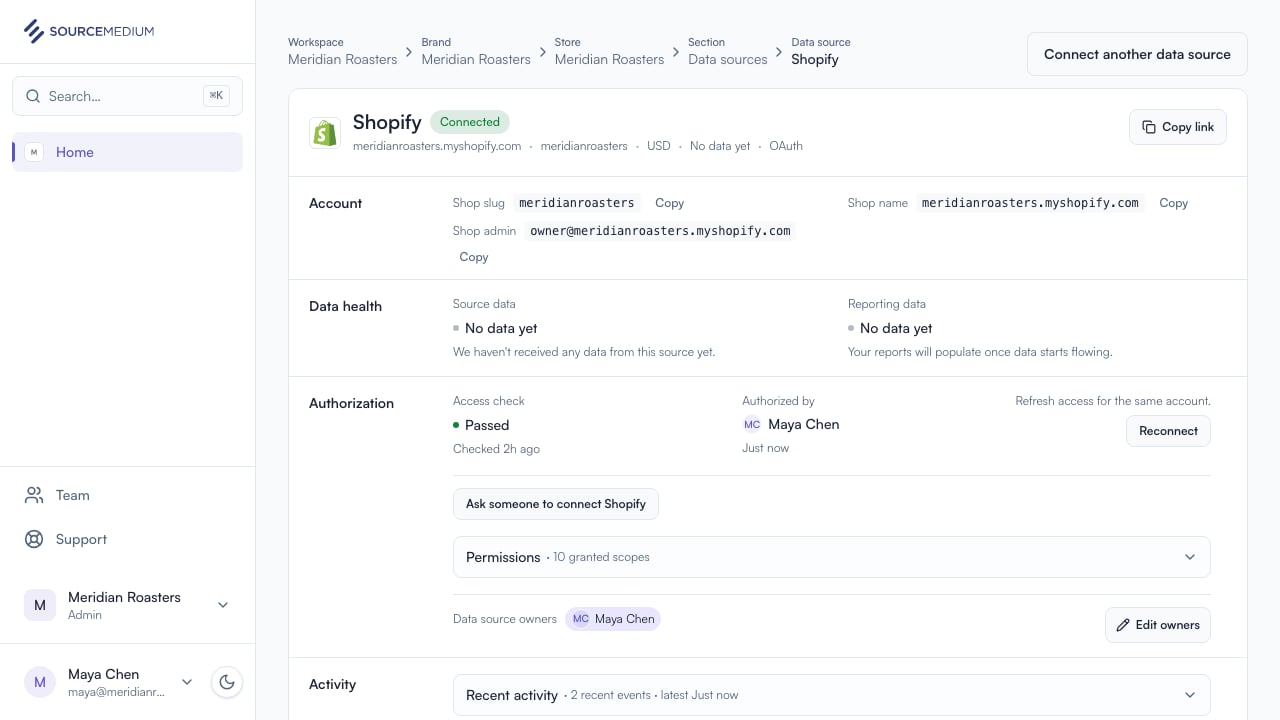
  <Step title="Confirm the connection is healthy">
    Shopify is connected again and ready to sync.
    <img src="https://mintcdn.com/sourcemedium/vJWhKdrmNWXiJXVp/images/product-tours/reconnect-data-source/04-shopify-reconnected.png?fit=max&auto=format&n=vJWhKdrmNWXiJXVp&q=85&s=0645b5390b0e83664d32d1b56e7e204d" alt="Confirm the connection is healthy" width="1280" height="720" data-path="images/product-tours/reconnect-data-source/04-shopify-reconnected.png" />
  </Step>
</Steps>

## Related

* [Connect a data source](/product-tours/connect-data-source)
* [Connection statuses](/product-tours/connection-statuses)
