> ## Documentation Index
> Fetch the complete documentation index at: https://docs.sourcemedium.com/docs/llms.txt
> Use this file to discover all available pages before exploring further.
# Can I set targets in my dashboard?
> How to configure metric targets in the configuration sheet and surface target widgets in Executive Summary.
## Requirements
Target setting is available as part of the SourceMedium feature set.
## Background
Please reach out to the SourceMedium Customer Solutions Analyst team to enable target setting and update your **Executive Summary** with the correct widgets.
* Net, Total and Gross Revenue
* Orders
* Spend
* AOV
* CPA
* CPO
* CVR
* Sessions
* ROAS
 ## Steps
1. Open your SourceMedium Configuration Sheet:
* Check your onboarding email thread for the Google Sheets link
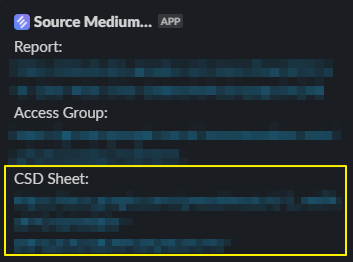
* Check your shared SourceMedium Slack channel for the Configuration Sheet link (often pinned)
* If you can’t find it, email [support@sourcemedium.com](mailto:support@sourcemedium.com)
## Steps
1. Open your SourceMedium Configuration Sheet:
* Check your onboarding email thread for the Google Sheets link
* Check your shared SourceMedium Slack channel for the Configuration Sheet link (often pinned)
* If you can’t find it, email [support@sourcemedium.com](mailto:support@sourcemedium.com)
 2. Open the `Targets` tab
3. Select a channel. This will be the sales channel that you are looking to track metrics for, i.e. `Online DTC` (Online DTC is the only option available at the moment for Target Setting as the feature is further developed).
4. Add a `date_start` in order to indicate when the goal is being tracked starts (We encourage MTD tracking).
5. Add a `date_end`, this sets the period of time that you want the target applied across. If left blank it will all be set for the `date_start` day.
* Targets are applied as **daily values** across the range from `date_start` to `date_end` (inclusive).
* If you want a monthly total target, enter the **per-day** target value for the month and set `date_end` to the last day of the period.
6. Add target values to the metrics you'd like to track.
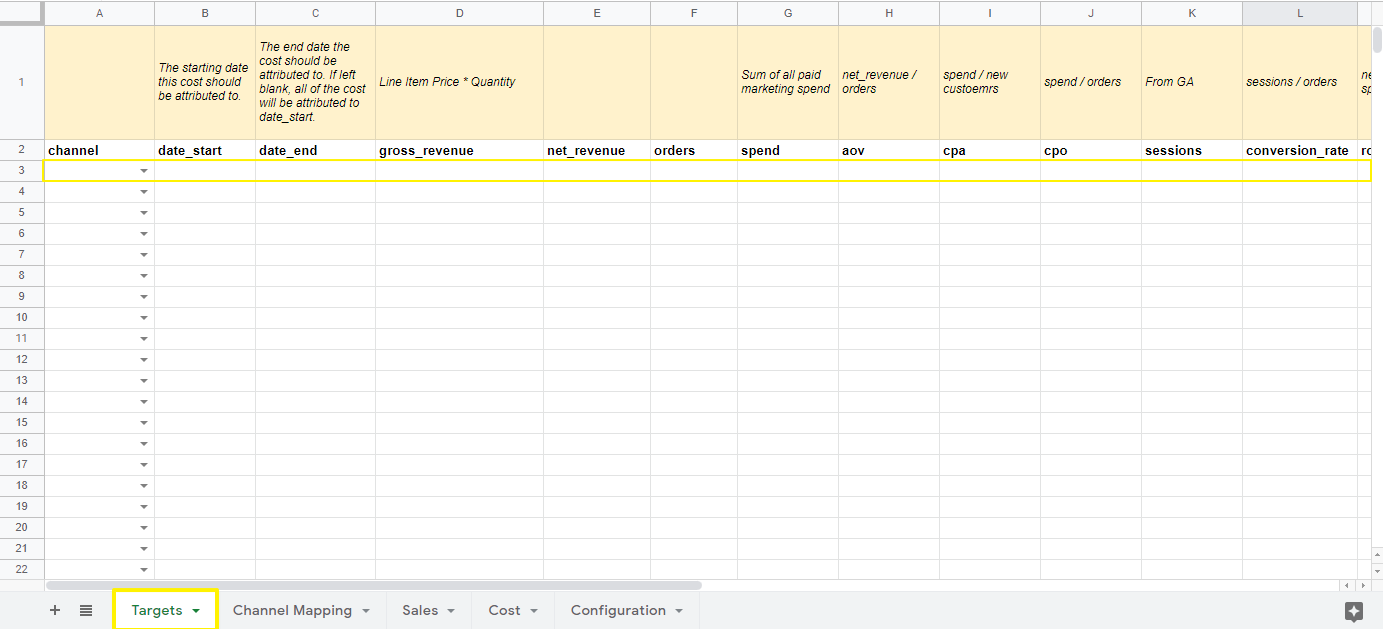
2. Open the `Targets` tab
3. Select a channel. This will be the sales channel that you are looking to track metrics for, i.e. `Online DTC` (Online DTC is the only option available at the moment for Target Setting as the feature is further developed).
4. Add a `date_start` in order to indicate when the goal is being tracked starts (We encourage MTD tracking).
5. Add a `date_end`, this sets the period of time that you want the target applied across. If left blank it will all be set for the `date_start` day.
* Targets are applied as **daily values** across the range from `date_start` to `date_end` (inclusive).
* If you want a monthly total target, enter the **per-day** target value for the month and set `date_end` to the last day of the period.
6. Add target values to the metrics you'd like to track.
 7. Reach out to the SourceMedium team in your Slack channel or at [support@sourcemedium.com](mailto:support@sourcemedium.com) to get the target widgets added to your dashboard!